← yongcaballero.com
  • In development
  • iOS & Android
  • Built for the Philippines
Waldazz app icon

Waldazz

Spend smart. Live more.

“How much will I have on payday?”

Waldazz is a money forecasting app for Filipinos, from a first sweldo to a family's bills. Add your accounts, bills, loans and sweldo once, and it shows you what you'll have on any date, what's safe to spend each day, and, before you buy something big, whether it fits and when it will.

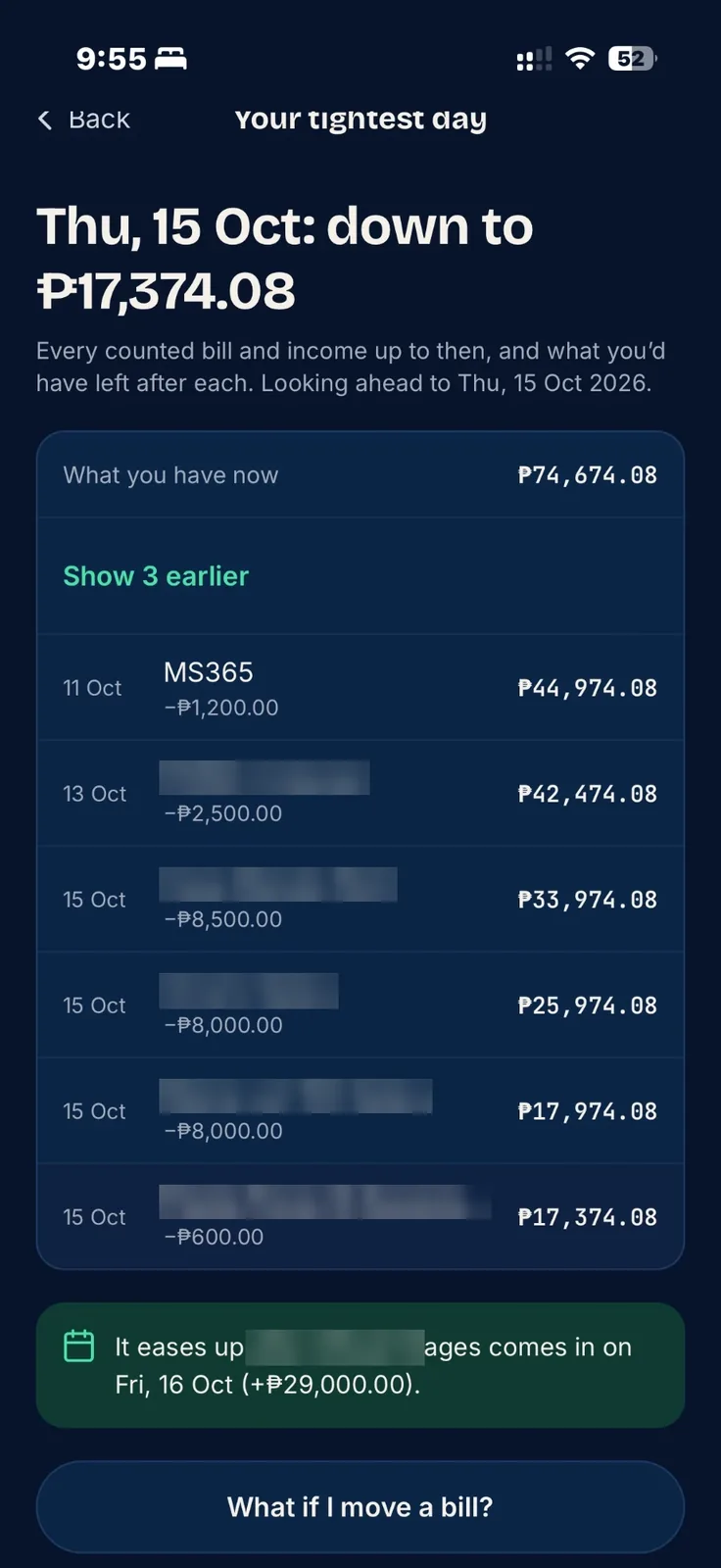
Waldazz: your tightest day, with every bill and the balance after each
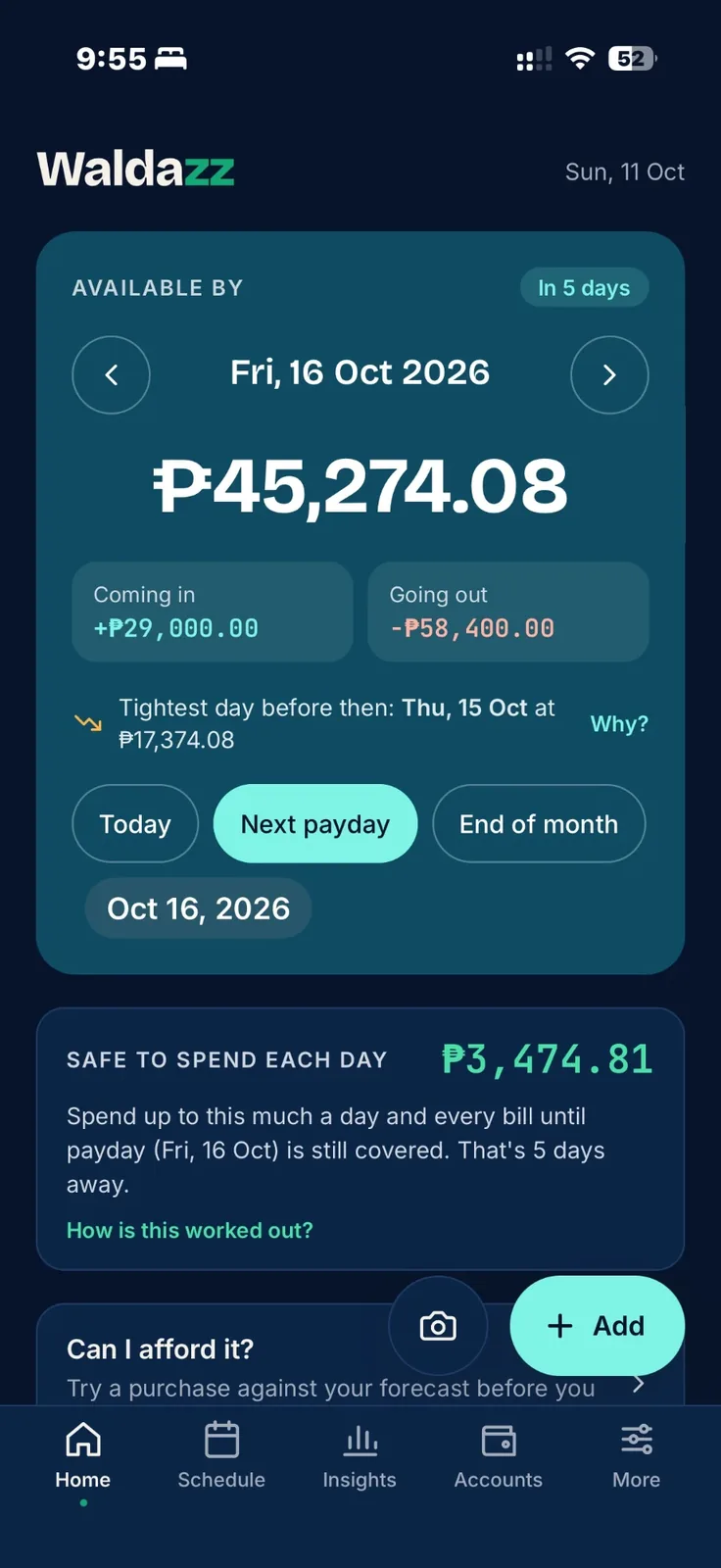
Waldazz home: available by next payday, and safe to spend each day
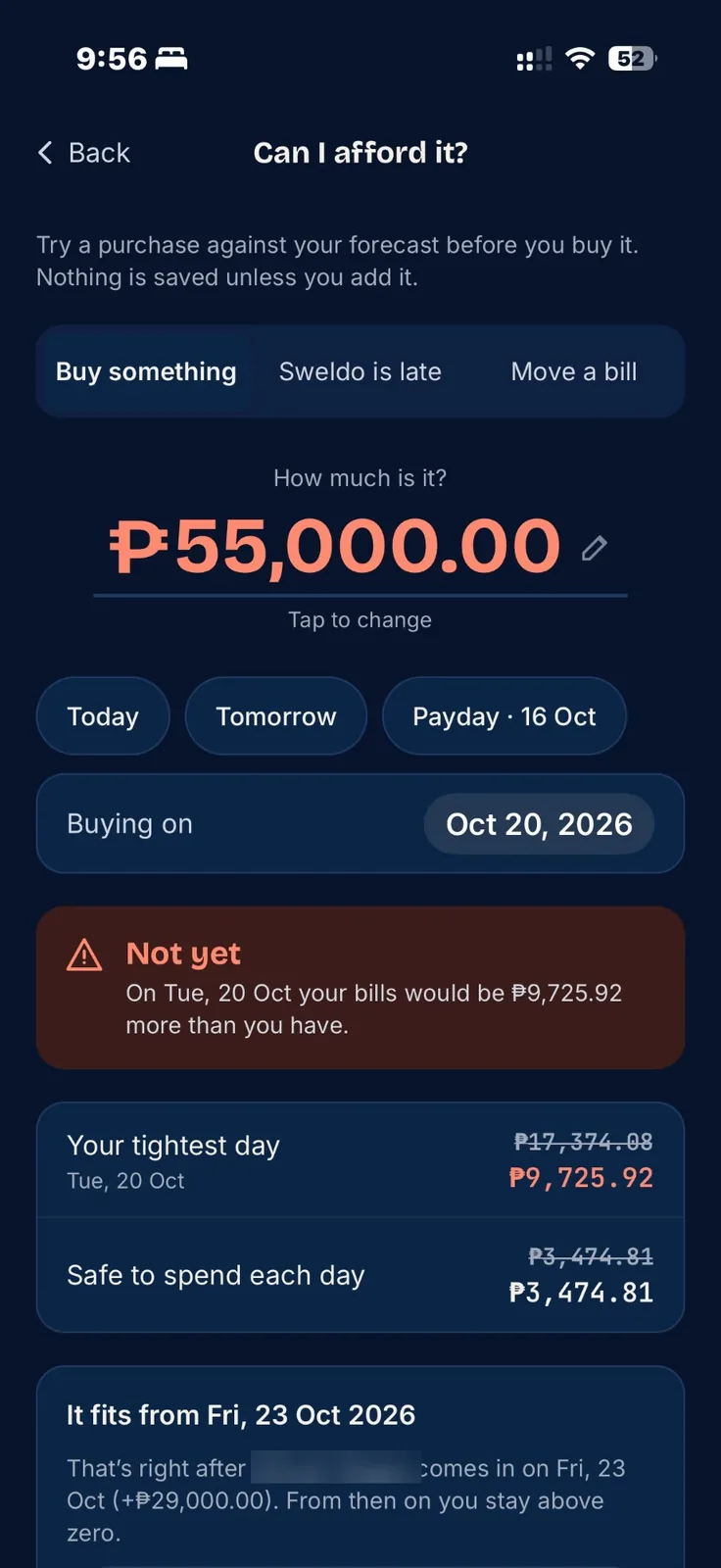
Waldazz: Can I afford it?

Why I built it

Three apps and a spreadsheet. Now, one.

For years I tracked my money in three different apps, and an Excel sheet to boot. Each one held part of the picture, and putting it all together was confusing.

And every time, the same temptation came back: just stop tracking.

So I built Waldazz from scratch: one app that records everything I need, from sweldo and bills to loans, utang and paluwagan, and shows what it all means for payday.

If juggling apps has ever made you want to give up on tracking, this one's for you.

Yong CaballeroDesigned & built Waldazz

Why it matters

Most Filipinos are one surprise away from utang.

These numbers come from the Bangko Sentral's 2025 Consumer Finance and Inclusion Survey and other recent studies. Each one comes with the part of Waldazz that helps.

3 in 10

Filipino adults have savings that could absorb an unexpected expense. The other 7 would have to borrow or go without.

In Waldazz: set a Cushion and add a Savings item every payday, so the emergency fund grows before you spend.

BSP Consumer Finance and Inclusion Survey 2025
6 in 10

Filipino families can't pay a ₱10,000 hospital bill outright.

In Waldazz: Can I afford it? shows in seconds whether a sudden expense fits, and on which day it would.

BCG, The Filipino Family study, 2025
32%

of loans taken in 2025 went to food and basic needs, the biggest reason Filipinos borrow. Borrowing to eat usually means the money ran out before payday.

In Waldazz: Safe to spend each day keeps the money for rent and bills out of your daily budget, so the last week before sweldo isn't empty.

BSP CFIS 2025, via GMA News

What Filipinos borrowed for, 2025 (% of loans)

Food & basic needs
32%
Education
15%
Health
14%
Farming
10%
Starting a business
9%
Household bills
9%
Home repairs
8%
Bars drawn on a 0–40% scale
34%

of borrowers often struggle to make their payments, and 8% take a new loan to pay an old one.

Pay easilyOften struggleBorrow to pay a loan

In Waldazz: every loan shows what's left and when it ends. Extra money tells you which loan a bonus should go to first.

BSP CFIS 2025, via GMA News
57%

of retail payments in the Philippines were digital in 2024 (GCash, Maya, cards, bank apps), up from 53% a year earlier. Money now leaks out in small taps.

In Waldazz: add every e-wallet as an account and log taps as a Spend. It takes five seconds.

BSP Status of Digital Payments 2024
How Waldazz thinks

It looks ahead to your tightest day, and plans around it.

Most budget apps tell you what you spent. Waldazz tells you what you can still spend. Here's one sweldo, from payday on the 15th to payday on the 30th.

Balance from payday to payday Example: ₱27,500 on payday the 15th. Rent, Meralco, internet and a loan bring it down to ₱11,201 on the 25th, the tightest day. The next sweldo on the 30th brings it back up. With a ₱3,000 cushion, ₱8,201 is free to spend over 15 days, about ₱546 a day. ₱0₱10k₱20k₱30k₱40k 15 Oct202530 Oct Cushion ₱3,000 Sweldo ₱27,500 Rent −8,000 Meralco −2,400 Internet −1,699 Loan −4,200 Tightest day ₱11,201 Next sweldo Free to spend ₱8,201

Safe to spend, worked out

Tightest day before payday ₱11,201
− your cushion ₱3,000
= free ₱8,201
÷ 15 days to payday
= ₱546 a day

The big bill on the 25th is already set aside on the 15th. You won't spend the rent money by accident, because Waldazz never counts it as yours to spend.

Payday every 15th and 30th isn't an accident. The Labor Code says wages are paid at least twice a month, no more than 16 days apart. Waldazz is built around that rhythm.

Available by

The big number on Home. What you'll have on a date you pick, after every bill and every income until then. Tap Next payday or End of month.

Safe to spend each day

Your daily allowance until payday. Spend under it and every bill is still covered.

Cushion

An amount you never want to drop below. Waldazz keeps it out of your daily allowance.

Maintaining balance

The minimum your bank makes you keep. Waldazz never counts it as spendable.

Counted / not counted

A counted account is money you use. Turn it off for money you never touch, like an emergency fund or MP2.

Spend vs bill

A Spend is something already bought (food, fare, fuel). A bill is something coming up that you'll pay.

Tightest day

The lowest your money gets before the date you picked. Tap Why? to see every bill that brings it there.

Worth a look

A short check-up on Home: a balance not updated in a month, a bill days overdue, or a spend logged twice. It only shows when something needs fixing.

Savings goal

A target for a Savings item, with an optional date. Waldazz shows how far along you are, and what each saving needs to be to make it.

Can I afford it?

Not just yes or no. Why, and when.

Type the price and the day you want to buy. Waldazz runs it through every bill and every sweldo coming up, and answers the way a friend who knows your money would.

Not yet. On the 20th your bills would be ₱9,725.92 more than you have. It fits from the 23rd, right after your sweldo. Condensed from a real answer on my own phone
  1. The verdict. Yes, tight, or not yet, and how low your money would go.
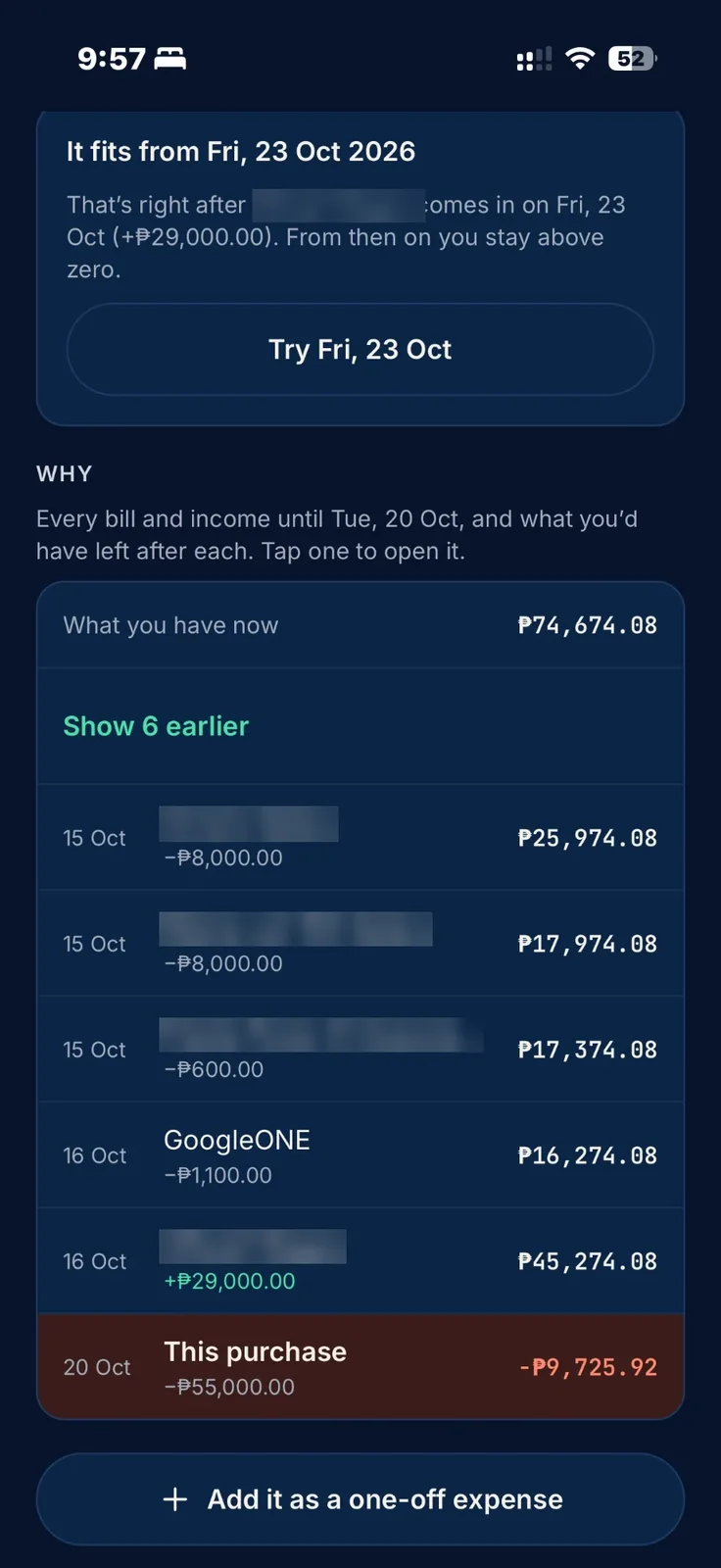
  2. The why. Every bill and income until your tightest day, with what you'd have left after each.
  3. The day it fits. The first safe date, and the sweldo that makes it safe. Tap Try to check it.
Can I afford it? Not yet, with the tightest day and Safe to spend before and after
Why: every bill until the tightest day, and the first day it fits
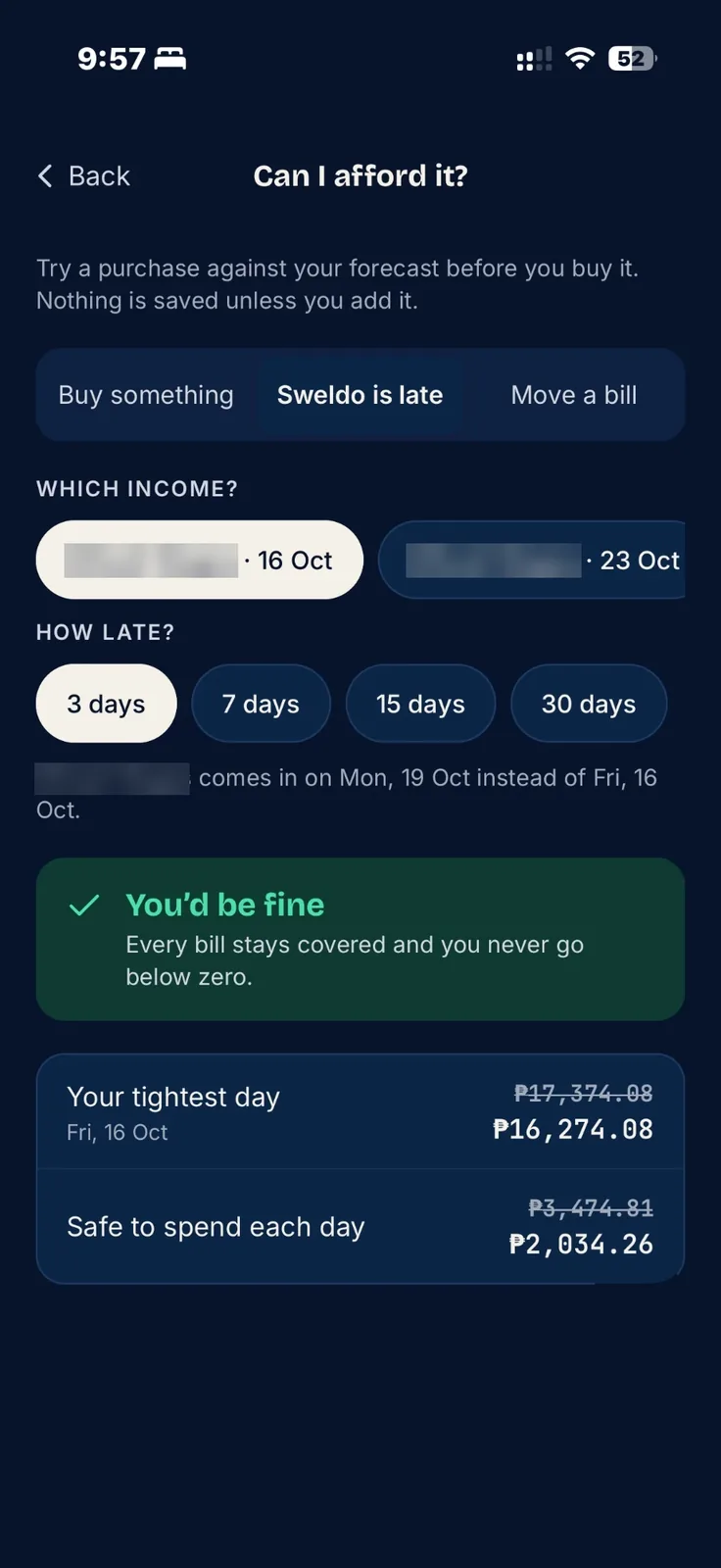
What if my sweldo is late? Three days late, every bill is still covered

What if the sweldo is late?

Pick the income and how late it might be, from 3 to 30 days. Waldazz shows whether every bill is still covered, and what happens to your daily number.

Move a bill works the same way: pick a bill and a new date, and see what it does before you ask for more time.

Nothing is saved until you add it, so you can try as many as you like.

What it does

Payday to payday, planned ahead.

Available by any date

Step day by day, or jump to today, next payday or end of month. It also flags your tightest day before then.

Safe to spend each day

One daily number that keeps every bill until payday covered, after a cushion you choose.

See why it's tight

Tap Why? for every bill between now and your tightest day, and what you'd have left after each.

Worth a look

A quick check-up on Home when a balance hasn't been updated in a month, a bill is days overdue, or a spend was logged twice.

Savings goals

Set a target and a date. It shows how far along you are, and how much each saving needs to be to make it.

Loans, utang and hulog

Flat or diminishing-balance loans with full payment plans, payment holidays and lender promos.

Gentle or Firm reminders

When someone owes you, send a Taglish (or Bisaya) reminder through Messenger, Viber or SMS. You pick the tone.

Paluwagan tracker

Your hulog each round, your turn to take the pot, and the organiser's fee.

Extra money

Got a bonus or your 13th month? See which loan it saves the most interest on.

Built for Filipino money

  • Maintaining balances
  • 15th & 30th sweldo
  • E-wallets & cash
  • Paluwagan
  • Fixed-term loan promos
  • BSP exchange rates
  • English, Filipino & Bisaya
  • No bank linking

PCSO Lotto

Your tickets, without the tickets.

Lots of us bet, and most of us have lost a slip in a wallet. Waldazz keeps the numbers, the draws, what it costs and whether you won in one place, so the paper ticket isn't the only record.

  1. Pick. Random numbers for one game or several at once: 6/42, 6/45, 6/49, 6/55 and 6/58, plus 6D, 4D, Swertres and EZ2. Don’t like one? Tap it and choose another.
  2. Plan the draws. One ticket can play the same numbers for up to 6 draws in a row, and Waldazz shows the dates.
  3. Know the cost. Bets × draws × price per bet, at PCSO's current ₱25 a bet for the 6-number games.
  4. Log it once. A week of tickets goes in as one spend, so your forecast and Safe to spend stay right.
  5. See if you won. Tap Get results and your matches light up, using the winning numbers GMA News publishes. Or type them yourself.

Just for fun: every combination has the same chance, and Waldazz doesn't sell tickets or predict draws. You must be 18 or older to bet.

Screens

From my own phone, real money and all.

Tap any screen to see it larger. Names, places and account labels are blurred; the amounts are real.

Get started · about 10 minutes

Set it up once, in this order.

The order matters. Accounts first, then the money coming in, then the money going out. The + button on any tab opens “What are you adding?”.

1

Add every place your money lives

Accounts → Add account
  1. Pick the type: Bank, E-wallet, Cash or Credit card.
  2. Open your bank or GCash app and copy today's balance. You only do this once.
  3. Enter the maintaining balance if your bank has one (for example ₱3,000).
  4. For an emergency fund, turn Count in available money off.

Do it for all of them: payroll account, GCash, Maya, wallet cash, cards. If one is missing, your numbers will be off.

2

Add your sweldo

+ → Bill or income → Income
  1. Enter what actually lands in your account (take-home pay, not gross).
  2. Under Repeats, pick Twice a month, then Paid on: 15th & 30th (or your own days).
  3. Pick the account it goes into.

Freelance or OFW padala? Add each one as income with its own date. If you're not sure it will come, turn off Count in my forecast.

3

Add your regular bills

+ → Bill or income → Expense
  • Rent or amortization, Meralco, water, internet, phone plan, tuition, insurance, helper's salary.
  • Set the first due date and how often it repeats. For AC cleaning or insurance, use every 3, 6 or 12 months.
  • Turn on a Reminder (1 day before is a good default).
  • Bills with a set number of payments that started before today? Set Payments already made.
4

Add loans and utang (both ways)

+ → Borrow money · Lend money
  • Know the rate? Pick Rate. Only know the monthly hulog? Pick Payment. Waldazz works out the real interest for you.
  • Different amounts over time (₱2,500, then ₱3,000)? Pick Custom plan.
  • Lender gave you payment holidays (months with no hulog)? In the plan, tap + Payment holiday. The payment table marks those months Holiday.
  • Loan from months ago: under Money received into, pick Already spent.
  • Home Credit? Turn on Last payment free if all are on time.
  • Salary deduction: pick No account, and it's tracked automatically.
5

Set your cushion and turn on the heads-up

More → Cushion
  • Keep at least: start with what one week of groceries and fare costs you. Raise it later.
  • Turn on Heads-up when money gets tight. Waldazz warns you if any day in the next two weeks dips below it.
  • Turn on Lock with Face ID under Privacy if others use your phone.

Done. Go back to Home. The big number and Safe to spend now reflect your real life.

The habit

30 seconds a day. 5 minutes a payday.

Waldazz only knows what you tell it. Keep it up to date and it stays right.

Every day

Look, log, done.

30 seconds
  • Open Home. Read Safe to spend each day.
  • Bought something? + → Spend. Pick a quick name like Food or Transport.
  • Paid a bill? Tap it in Due soon, then Record payment.
  • See Worth a look? Tap the line and fix it.
Every payday

Pay yourself first.

5 minutes
  • Record your sweldo. Correct the amount if it was different.
  • Record your Savings item before anything else.
  • Open the Paycheck planner: see what this sweldo covers and what's left.
Once a month

Check the leaks.

10 minutes
  • Open Insights: where the money went, by category.
  • Look at What you owe and your debt-free date.
  • Make a Back up to Google Drive or OneDrive.
“What do I tap?”

Real situations, and exactly where to go.

“Kaya ko ba ‘to?” Thinking of buying something.

Enter the price and the day. You'll see yes, tight or not yet. If it's not yet, Why lists every bill until your tightest day, and Waldazz gives the first day it fits, often right after your sweldo.

Home → Can I afford it?
Someone owes you and forgot.

Tap Remind on Home, or open the loan. Pick Gentle or Firm, and send a Taglish reminder through Messenger, Viber or SMS. You can edit it first, and the loan shows when you last sent one.

Loan → Send a reminder
You got your 13th month or a bonus.

Enter the amount. Waldazz shows which loan it saves the most interest on.

More → Extra money
You paid a bill but not in full.

Change the amount when recording. Keep the rest due on a new date.

Bill → Record payment
You tapped the wrong thing.

Recent payments show on Home with Undo. Spends have Remove spend.

Home → Paid recently
You paid extra on a loan.

On a loan with interest on the balance, a lump sum comes straight off the principal and next month's interest goes down.

Loan → Pay toward principal
Your lender gave you a payment holiday.

Add it to the loan's plan with + Payment holiday. On a loan with interest on the balance, that month's interest is added to what you owe, and the table shows it.

Loan → Edit → + Payment holiday
You joined a paluwagan.

Add your hulog each round and your payout turn. Both land on your schedule.

+ → Paluwagan
You moved money from GCash to the bank.

Record it as a transfer, with the fee. Your total doesn't change except for the fee.

Accounts → Transfer
A client paid you in dollars.

See today's BSP reference rate for 31 currencies.

More → Currency converter
A bill skips a month, or moves.

Open the date and choose Skip or Move date. Only that one date changes.

Item → Coming up
A loan is deducted from a salary.

Pick No account. Each deduction counts as paid on its date, and the balance goes down by itself.

Loan form → No account
Money looks tight before payday.

Tap Why? next to your tightest day. You'll see every bill until then and what you'd have left after each, so you know which one to move.

Home → Tightest day → Why?
Your sweldo might come in late.

Pick the income and how late, from 3 to 30 days. Waldazz shows whether every bill is still covered.

Can I afford it? → Sweldo is late
You need to pay a bill later than usual.

Pick the bill and the new date, and see what it does before you ask for more time. To make it stick, use Move date on the bill.

Can I afford it? → Move a bill
You're saving for something.

Give a Savings item a goal, and a date if you like. It shows your progress and how much each saving needs to be.

+ → Savings → Goal
Home says “Worth a look”.

A balance not updated in a month, a bill a few days overdue, or a spend logged twice. Tap the line to fix it.

Home → Worth a look
You'd rather read it in Filipino or Bisaya.

Switch the whole app. Amounts and dates stay the same.

More → Language
You bet on the lotto every week.

Select your games (one tap for all the 6-number games), set the bets and draws (up to 6), pick, and save them all at once. My tickets shows the total, and logs the whole week as one spend.

More → PCSO Lotto → Save
Did my numbers win?

Tap Get results on a ticket (or for all your tickets at once). Waldazz reads the winning numbers GMA News publishes and lights up your matches, no paper slip needed. You can also type them.

PCSO Lotto → My tickets → tap a draw
You need numbers for the lotto.

Pick one game or several, how many bets and how many draws. Waldazz shuffles random numbers and shows the dates and the total cost. Don't like a number? Tap it to choose another.

More → PCSO Lotto
Money rules that work

Six habits for the 15th-and-30th life.

These are common-sense habits, not financial advice. Each one is something Waldazz makes easy.

1

Bills first, then everything else.

The moment sweldo lands, rent, utilities and hulog are already spoken for. Waldazz sets them aside before showing Safe to spend.

2

Save on payday, not “kung may matira”.

Whatever's left at the end is usually nothing. Add a Savings item twice a month, so it's treated like a bill.

3

Build a cushion, then a real emergency fund.

Start with one month of bills. Then aim for three. Keep it in an account that's not counted, so it never feels like spending money.

4

Know what a loan really costs.

“1.67% a month” on the full amount is closer to 2.9% a month on what you still owe. Enter the hulog with Payment and Waldazz shows both rates.

5

Utang with love, but in writing.

Record every peso lent, even to family. A friendly reminder on the due date beats an awkward talk three months later.

6

Sleep on big buys.

Check Can I afford it? before you check out. If it says “not yet”, it shows the bills behind it and the day it fits. Usually that's right after sweldo.

Questions

Good to know.

Everything stays on your phone

No account, no sign-up and no server. Waldazz never connects to your bank, GCash or Maya, and there's an optional Face ID or fingerprint lock.

In the language you think in

English, Filipino or Bisaya, switched in one tap. Money words stay the way people say them: sweldo, hulog, utang.

Helpful, never preachy

Waldazz doesn't scold you for spending. It shows what a choice does to the days ahead, so you can decide with your eyes open.

Does Waldazz see my bank account?

No. Waldazz never connects to your bank, GCash or Maya. You type in the balances yourself, once, and Waldazz keeps them up to date as you record payments.

Where is my data stored?

Only on your phone. There's no account, no sign-up and no server. Waldazz only downloads public information: the BSP exchange rates for the converter and PCSO lotto results. The privacy policy has the details.

What if I lose my phone?

Your data goes with it unless you've backed up. Make a backup once a month: More → Back up, and save it to Google Drive, OneDrive or email.

My balance in Waldazz doesn't match my bank.

Usually a spend wasn't logged or a payment wasn't recorded. Open the account and use Update balance to set it to what your bank app shows.

Why is Safe to spend ₱0?

Your bills before payday add up to more than you have, after your cushion. Look at Due soon and the Schedule: you may need to move a bill, lower the cushion, or wait for sweldo. Tap How is this worked out?, then See the bills behind this, to see which ones.

Do I log every coffee?

For the daily number to be right, yes, but it takes five seconds: + → Spend, pick Coffee, enter the amount. Bigger purchases matter most.

Is Waldazz in Filipino or Bisaya?

Yes. More → Language switches the whole app to Filipino or Bisaya (Cebuano). The utang reminder is in Taglish in English and Filipino, and in Bisaya in Bisaya.

Gentle or Firm reminder?

Gentle is friendly and patient, for a first nudge. Firm is a direct follow-up, still polite, for when it's been a while. You pick it on the loan's screen, or when you tap Remind on Home. Both open as a draft you can change before sending, and Waldazz remembers which one you use.

Take the guide with you.

The whole guide as a printable PDF: the Filipino money facts, how Waldazz thinks, set-up, the daily habit, every situation and the questions.

Download the PDF
Enlarged screen